
| 月 | 火 | 水 | 木 | 金 | 土 | 日 |
|---|---|---|---|---|---|---|
| 1 | ||||||
| 2 | 3 | 4 | 5 | 6 | 7 | 8 |
| 9 | 10 | 11 | 12 | 13 | 14 | 15 |
| 16 | 17 | 18 | 19 | 20 | 21 | 22 |
| 23 | 24 | 25 | 26 | 27 | 28 | |
定休日
| 月 | 火 | 水 | 木 | 金 | 土 | 日 |
|---|---|---|---|---|---|---|
| 1 | ||||||
| 2 | 3 | 4 | 5 | 6 | 7 | 8 |
| 9 | 10 | 11 | 12 | 13 | 14 | 15 |
| 16 | 17 | 18 | 19 | 20 | 21 | 22 |
| 23 | 24 | 25 | 26 | 27 | 28 | 29 |
| 30 | 31 | |||||
定休日
| 月 | 火 | 水 | 木 | 金 | 土 | 日 |
|---|---|---|---|---|---|---|
| 1 | ||||||
| 2 | 3 | 4 | 5 | 6 | 7 | 8 |
| 9 | 10 | 11 | 12 | 13 | 14 | 15 |
| 16 | 17 | 18 | 19 | 20 | 21 | 22 |
| 23 | 24 | 25 | 26 | 27 | 28 | |
定休日
| 月 | 火 | 水 | 木 | 金 | 土 | 日 |
|---|---|---|---|---|---|---|
| 1 | ||||||
| 2 | 3 | 4 | 5 | 6 | 7 | 8 |
| 9 | 10 | 11 | 12 | 13 | 14 | 15 |
| 16 | 17 | 18 | 19 | 20 | 21 | 22 |
| 23 | 24 | 25 | 26 | 27 | 28 | 29 |
| 30 | 31 | |||||
定休日
「ただ定休日を表示したいだけなのに、設定が難しすぎる…」 そんな悩みを解消するために、休日だけに特化しシンプルさを極めた WordPressプラグイン「定休日カレンダー」を開発しました。
多機能すぎる予約システムや、日本の祝日に対応していない海外製プラグインに苦労する必要はもうありません。


「定休日カレンダー」主な機能・特徴
- 直感的な定休日・祝日設定
- 曜日をクリックするだけのシンプル操作。
- 日本の祝日設定はもちろん、臨時休業や振替休日も個別に素早く設定可能です。
- どこにでも置ける柔軟な設置機能
- 「ブロックエディタ」および「ウィジェット」に完全対応。
- 店舗紹介、会社概要、サイトフッターなど、必要な場所にいくつでも設置できます。
- メンテナンス不要
- 毎月設定しなくても、自動で当月のカレンダーを表示。
- 操作性に優れた「次月表示」
- ページ遷移なしで、スクロールにより翌月の予定をスムーズに確認可能。
- 「来月の休みを知りたい」というユーザーの離脱を防ぎます。
- サイトに馴染むデザインカスタマイズ
- 定休日の背景色や文字色を、管理画面からサイトのブランドカラーに合わせて自由に変更できます。
- 運用を邪魔しない軽量設計
- 日本語専用設計やJS不使用等、余計な機能を削ぎ落としたことで、サイトの読み込み速度(ページスピード)への影響を最小限に抑えました。
- ほとんどのテーマに対応
- たいていのテーマに対応していますが、表示確認をしたい場合は 後述のHTMLコード を設置してお試しください。
動作環境
「WordPress」
WordPress日本語版 バージョン6.6 以降
「サーバー」
PHPバージョン 8.0 ~ 8.3
MySQLバージョン 8.0 以上または MariaDB 10.5 以上
定休日カレンダー 購入・ダウンロード
サブスクリプション
990円 (900円 + 税) / 年
買い切り
2,970円 (2,700円 + 税)
導入方法
上記の 「購入・ダウンロード」より定休日カレンダーを購入、ダウンロードしてください。
①プラグイン新規追加をクリック
②アップロードをクリック
③「ZIP 形式のプラグインをインストール」で ダウンロード した プラグインファイル(ZIPファイル) を 選択して「いますぐインストール」をクリックしてください。
④インストールが終了したら「有効化」にしてください。
※解凍してFTPでアップロードすると不完全になる場合がありますのでお勧め致しません。
定休日カレンダーの設置と設定方法
定休日カレンダーブロックまたは定休日カレンダーウィジェットを設置後、以下の項目から休日の設定が簡単に行えます。
① 定休曜日
② 営業日(※特定の休日を営業日にする設定)
③ 日付指定定休日
④ 国民の祝日
⑤ 文字色。背景色の設定
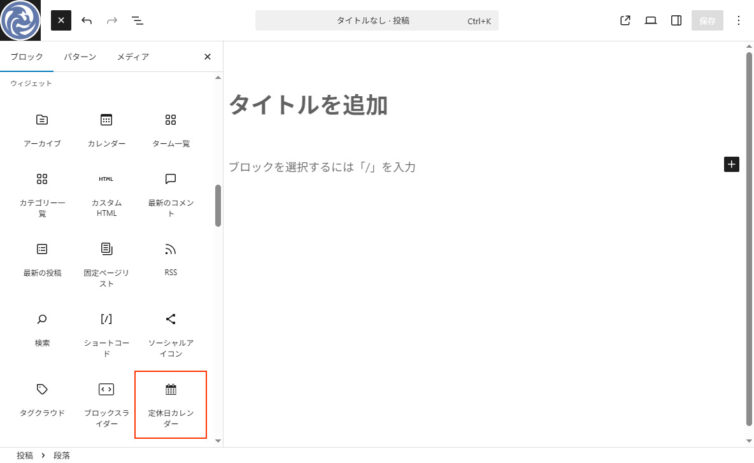
設置
投稿/固定ページエディタ または テンプレートエディタで、ウィジェットカテゴリ内の「定休日カレンダー」ブロックを選択します。
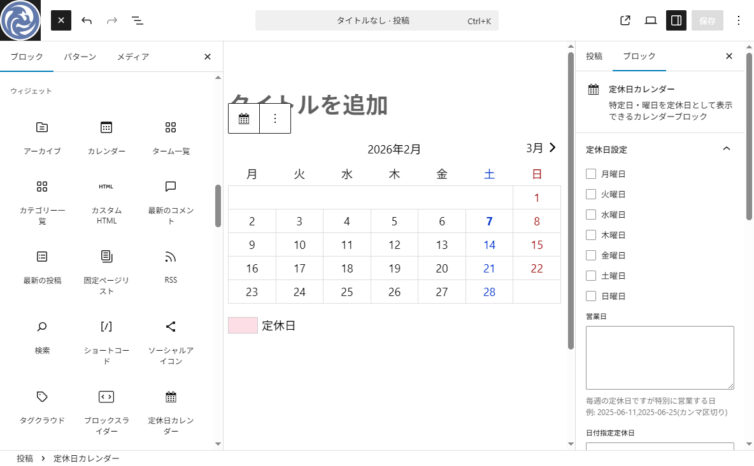
定休日カレンダーが設置されました。
これから定休日設定をおこなっていきます。
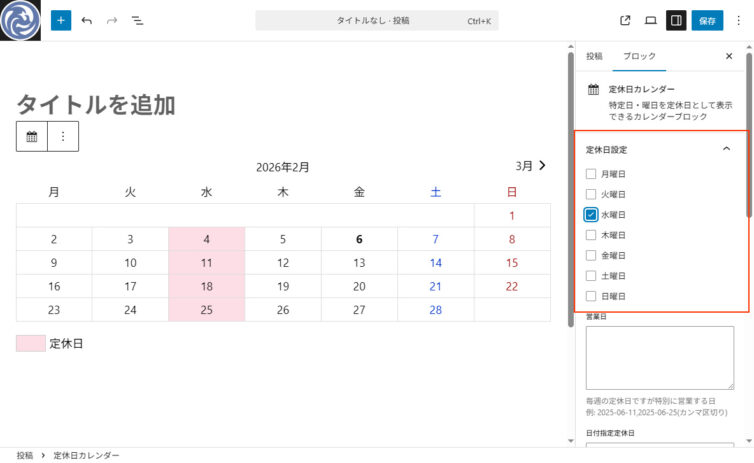
定休曜日
決まった曜日が定休日の場合は、曜日にチェックを入れてください。
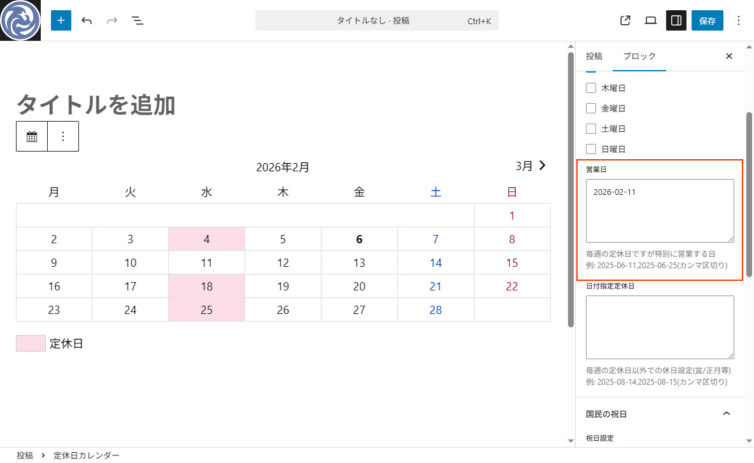
営業日
設定した定休曜日ですが、例外で営業する場合は該当の年月日を入力してください。
書式は YYYY-MM-DD です。複数ある場合はカンマ区切りで追加してください。
例 2025-07-09,2025-07-23
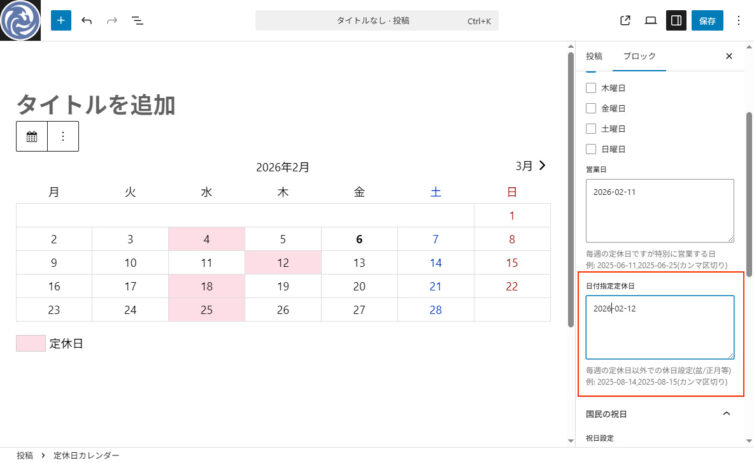
日付指定定休日
盆/正月等で毎週の定休日以外での休日がある場合は該当の年月日を入力してください。
書式は YYYY-MM-DD です。複数ある場合はカンマ区切りで追加してください。
例 2025-07-17,2025-08-14,2025-08-15
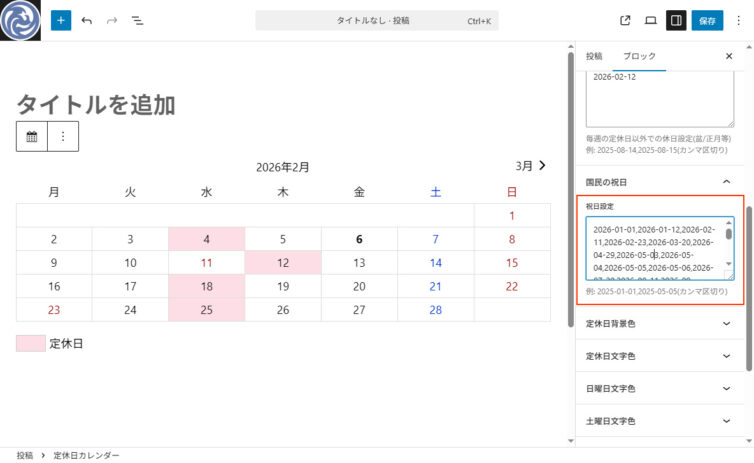
国民の祝日
国民の祝日を設定したい場合は該当の年月日を入力してください。
書式は YYYY-MM-DD です。複数ある場合はカンマ区切りで追加してください。
例 2025-07-21,2025-08-11,2025-09-15,・・・
※国民の祝日は「国民の祝日」について | 内閣府 で調べる事ができます。
【参考】令和8年(2026年)及び令和9年(2027年)の国民の祝日
2026-01-01,2026-01-12,2026-02-11,2026-02-23,2026-03-20,2026-04-29,2026-05-03,2026-05-04,2026-05-05,2026-05-06,2026-07-20,2026-08-11,2026-09-21,2026-09-22,2026-09-23,2026-10-12,2026-11-03,2026-11-23,
2027-01-01,2027-01-11,2027-02-11,2027-02-23,2027-03-21,2027-03-22,2027-04-29,2027-05-03,2027-05-04,2027-05-05,2027-07-19,2027-08-11,2027-09-20,2027-09-23,2027-10-11,2027-11-03,2027-11-23,
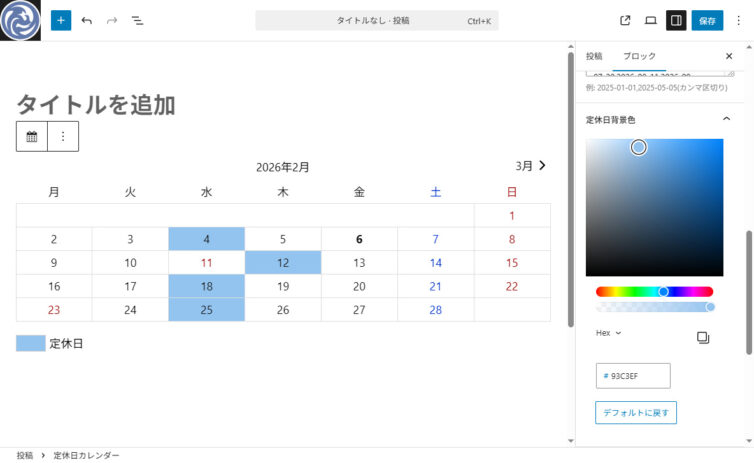
定休日背景色
定休日セルの背景色を変更した場合はこちらのカラーパレットを操作して背景色をお好みの色に変更してください。
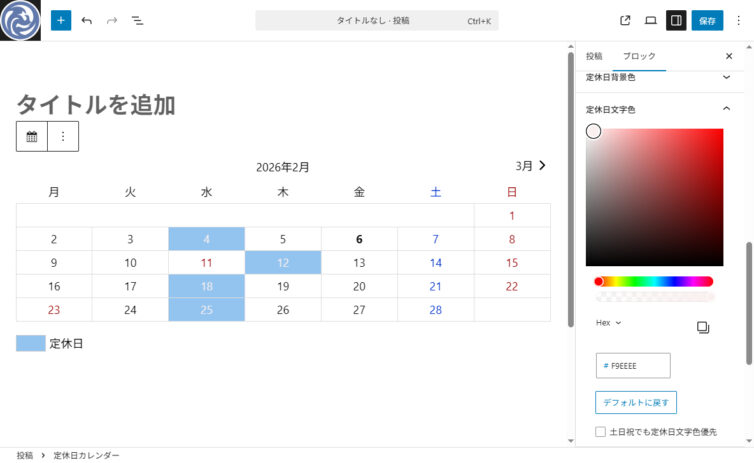
定休日文字色
定休日背景色変更にあわせて定休日文字色をする場合はこちらのカラーパレットを操作して背景色を変更してください。

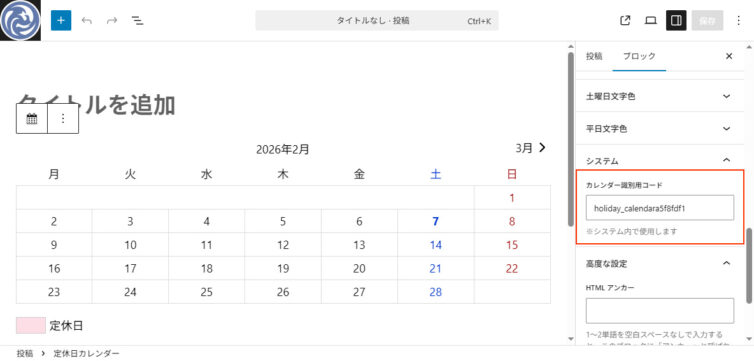
カレンダー識別用コード
個々のカレンダーを識別するコードです。自動採番されますので特に設定する必要はありません。
※定休日カレンダーブロックをコピーした場合はカレンダー識別用コードが重複しますのでこの場合のみ、他のユニークなコードに変更してください。
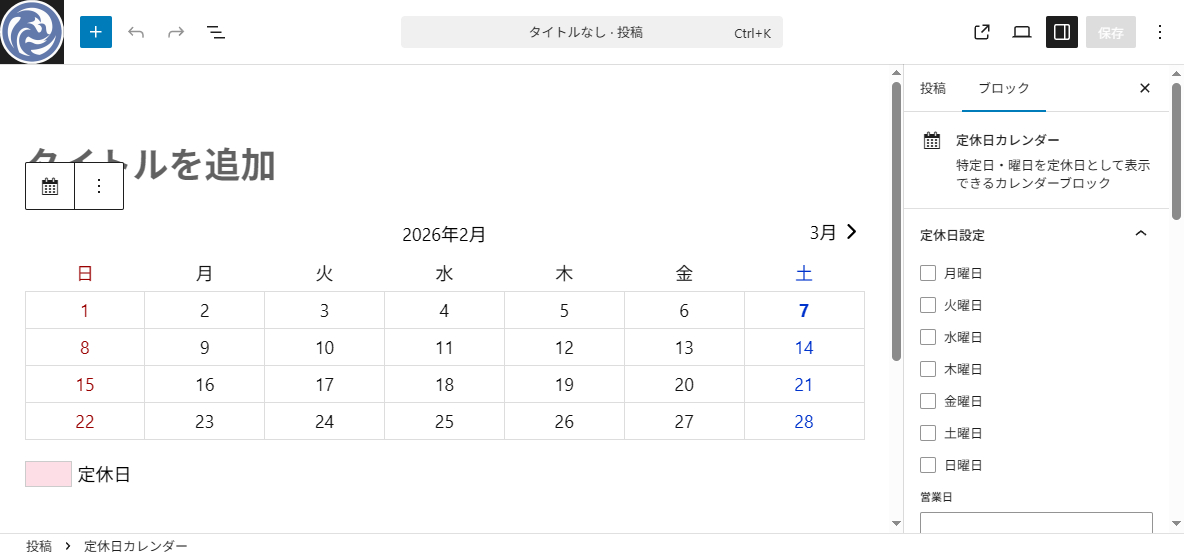
週の始まり
定休日カレンダーのデフォルトは「月曜日」が週の始まりになっています。
変更したい場合は、設定→一般で週の始まりを変更する事ができます。

【参考】週の始まりを日曜日に変更した場合

表示確認テスト
たいていのテーマに対応していますが、表示確認をしたい場合は 利用したいサイトの投稿ページ等で、以下のHTMLコードを「カスタムHTMLブロック」で貼り付けてみてください。
<style>.holiday_calendar_demotest .shop_holiday{ background-color:#fddde6; color:#111111;}.holiday_calendar_demotest tr th,.holiday_calendar_demotest tr td{ color:#111111}.holiday_calendar_demotest .national_holiday,.holiday_calendar_demotest .sun{ color:#9A0101}.holiday_calendar_demotest .sat{ color:#0033cc}.holiday_calendar_demotest{min-width:220px}.holiday_calendar_demotest .calendar-inner{text-align:center}.holiday_calendar_demotest .calendar-inner table caption{text-align:center!important;margin:0 0 5px;padding:0!important;line-height:1.8}.holiday_calendar_demotest .calendar-inner table{border-collapse:collapse;border:none;width:100%}.holiday_calendar_demotest .calendar-inner table thead{border:none}.holiday_calendar_demotest .calendar-inner th{font-weight:400;border:none;padding:.25em .25em;text-align:center}.calendar-inner tr td{border:1px solid #ddd!important;padding:.25em;text-align:center}.holiday_calendar_demotest caption{text-align:center}.holiday_calendar_demotest .today{font-weight:700}.holiday_calendar_demotest p.holiday-sample span{border:1px solid #ccc;margin:0 6px 0 0;padding:0 0 0 45px}.holiday_calendar_demotest{position:relative;width:100%;margin:0 auto}.holiday_calendar_demotest-activate{display:none!important}.holiday_calendar_demotest-main{overflow:hidden;position:relative}.holiday_calendar_demotest-main-track{display:flex;white-space:nowrap;transition:transform 0.3s ease-out}.holiday_calendar_demotest-main-item{flex-shrink:0;width:100%}.holiday_calendar_demotest-main-control-item{display:none}.holiday_calendar_demotest .calendar-btn-prev,.holiday_calendar_demotest .calendar-btn-next{position:absolute;top:0;right:0;z-index:1;display:flex;align-items:center;justify-content:center;transition:opacity 0.3s;cursor:pointer;font-weight:initial;font-size:revert}.holiday_calendar_demotest .calendar-btn-prev{right:auto;left:0}.holiday_calendar_demotest-activate:nth-child(1):checked~.holiday_calendar_demotest-main .holiday_calendar_demotest-main-control-item:nth-child(1){display:block}.holiday_calendar_demotest-activate:nth-child(1):checked~.holiday_calendar_demotest-main .holiday_calendar_demotest-main-track{transform:translateX(calc(-100% * 0))}.holiday_calendar_demotest-activate:nth-child(2):checked~.holiday_calendar_demotest-main .holiday_calendar_demotest-main-control-item:nth-child(2){display:block}.holiday_calendar_demotest-activate:nth-child(2):checked~.holiday_calendar_demotest-main .holiday_calendar_demotest-main-track{transform:translateX(calc(-100% * 1))}</style>
<div class="holiday_calendar_demotest fudou_block wp-block-fudou-fudou-holiday-calendar">
<input class="holiday_calendar_demotest-activate" type="radio" id="holiday_calendar_demotest-radio1" name="holiday_calendar_demotest-radio" checked>
<input class="holiday_calendar_demotest-activate" type="radio" id="holiday_calendar_demotest-radio2" name="holiday_calendar_demotest-radio">
<div class="holiday_calendar_demotest-main">
<div class="holiday_calendar_demotest-main-control">
<div class="holiday_calendar_demotest-main-control-item">
<label class="calendar-btn-next" for="holiday_calendar_demotest-radio2">
3月<span style="line-height: 1;"><svg xmlns="http://www.w3.org/2000/svg" width="1.5em" height="1.5em" viewBox="0 0 24 24"><g fill="none" fill-rule="evenodd"><path d="M24 0v24H0V0h24ZM12.593 23.258l-.011.002-.071.035-.02.004-.014-.004-.071-.035c-.01-.004-.019-.001-.024.005l-.004.01-.017.428.005.02.01.013.104.074.015.004.012-.004.104-.074.012-.016.004-.017-.017-.427c-.002-.01-.009-.017-.017-.018Zm.265-.113-.013.002-.185.093-.01.01-.003.011.018.43.005.012.008.007.201.093c.012.004.023 0 .029-.008l.004-.014-.034-.614c-.003-.012-.01-.02-.02-.022Zm-.715.002a.023.023 0 0 0-.027.006l-.006.014-.034.614c0 .012.007.02.017.024l.015-.002.201-.093.01-.008.004-.011.017-.43-.003-.012-.01-.01-.184-.092Z"/><path fill="currentColor" d="M15.707 11.293a1 1 0 0 1 0 1.414l-5.657 5.657a1 1 0 1 1-1.414-1.414l4.95-4.95-4.95-4.95a1 1 0 0 1 1.414-1.414l5.657 5.657Z"/></g></svg></span>
</label>
</div>
<div class="holiday_calendar_demotest-main-control-item">
<label class="calendar-btn-prev" for="holiday_calendar_demotest-radio1">
<span style="line-height: 1;"><svg xmlns="http://www.w3.org/2000/svg" width="1.5em" height="1.5em" viewBox="0 0 24 24"><g fill="none" fill-rule="evenodd"><path d="M24 0v24H0V0h24ZM12.593 23.258l-.011.002-.071.035-.02.004-.014-.004-.071-.035c-.01-.004-.019-.001-.024.005l-.004.01-.017.428.005.02.01.013.104.074.015.004.012-.004.104-.074.012-.016.004-.017-.017-.427c-.002-.01-.009-.017-.017-.018Zm.265-.113-.013.002-.185.093-.01.01-.003.011.018.43.005.012.008.007.201.093c.012.004.023 0 .029-.008l.004-.014-.034-.614c-.003-.012-.01-.02-.02-.022Zm-.715.002a.023.023 0 0 0-.027.006l-.006.014-.034.614c0 .012.007.02.017.024l.015-.002.201-.093.01-.008.004-.011.017-.43-.003-.012-.01-.01-.184-.092Z"/><path fill="currentColor" d="M8.293 12.707a1 1 0 0 1 0-1.414l5.657-5.657a1 1 0 1 1 1.414 1.414L10.414 12l4.95 4.95a1 1 0 0 1-1.414 1.414l-5.657-5.657Z"/></g></svg></span>2月
</label>
</div>
</div>
<div class="holiday_calendar_demotest-main-track">
<div class="holiday_calendar_demotest-main-item">
<div class="calendar-inner">
<table id="wp-calendar" class="wp-calendar-table">
<caption>2026年2月</caption>
<thead>
<tr>
<th class="mon" scope="col" aria-label="月曜日">月</th>
<th class="tue" scope="col" aria-label="火曜日">火</th>
<th class="wed" scope="col" aria-label="水曜日">水</th>
<th class="thu" scope="col" aria-label="木曜日">木</th>
<th class="fri" scope="col" aria-label="金曜日">金</th>
<th class="sat" scope="col" aria-label="土曜日">土</th>
<th class="sun" scope="col" aria-label="日曜日">日</th>
</tr>
</thead>
<tbody>
<tr>
<td colspan="6" class="pad">?</td><td class="sun">1</td>
</tr>
<tr>
<td class="mon">2</td><td class="tue">3</td><td class="wed shop_holiday">4</td><td class="thu">5</td><td class="fri">6</td><td class="today sat">7</td><td class="sun">8</td>
</tr>
<tr>
<td class="mon">9</td><td class="tue">10</td><td class="wed shop_holiday national_holiday">11</td><td class="thu">12</td><td class="fri">13</td><td class="sat">14</td><td class="sun">15</td>
</tr>
<tr>
<td class="mon">16</td><td class="tue">17</td><td class="wed shop_holiday">18</td><td class="thu">19</td><td class="fri">20</td><td class="sat">21</td><td class="sun">22</td>
</tr>
<tr>
<td class="mon national_holiday">23</td><td class="tue">24</td><td class="wed shop_holiday">25</td><td class="thu">26</td><td class="fri">27</td><td class="sat">28</td>
<td class="pad" colspan="1">?</td>
</tr>
</tbody>
</table>
</div>
<p class="holiday-sample"><span class="shop_holiday"> </span>定休日</p>
</div>
<div class="holiday_calendar_demotest-main-item">
<div class="calendar-inner">
<table id="wp-calendar" class="wp-calendar-table">
<caption>2026年3月</caption>
<thead>
<tr>
<th class="mon" scope="col" aria-label="月曜日">月</th>
<th class="tue" scope="col" aria-label="火曜日">火</th>
<th class="wed" scope="col" aria-label="水曜日">水</th>
<th class="thu" scope="col" aria-label="木曜日">木</th>
<th class="fri" scope="col" aria-label="金曜日">金</th>
<th class="sat" scope="col" aria-label="土曜日">土</th>
<th class="sun" scope="col" aria-label="日曜日">日</th>
</tr>
</thead>
<tbody>
<tr>
<td colspan="6" class="pad">?</td><td class="sun">1</td>
</tr>
<tr>
<td class="mon">2</td><td class="tue">3</td><td class="wed shop_holiday">4</td><td class="thu">5</td><td class="fri">6</td><td class="sat">7</td><td class="sun">8</td>
</tr>
<tr>
<td class="mon">9</td><td class="tue">10</td><td class="wed shop_holiday">11</td><td class="thu">12</td><td class="fri">13</td><td class="sat">14</td><td class="sun">15</td>
</tr>
<tr>
<td class="mon">16</td><td class="tue">17</td><td class="wed shop_holiday">18</td><td class="thu">19</td><td class="fri national_holiday">20</td><td class="sat">21</td><td class="sun">22</td>
</tr>
<tr>
<td class="mon">23</td><td class="tue">24</td><td class="wed shop_holiday">25</td><td class="thu">26</td><td class="fri">27</td><td class="sat">28</td><td class="sun">29</td>
</tr>
<tr>
<td class="mon">30</td><td class="tue">31</td>
<td class="pad" colspan="5">?</td>
</tr>
</tbody>
</table>
</div>
<p class="holiday-sample"><span class="shop_holiday"> </span>定休日</p>
</div>
</div>
</div>
</div>
※あくまで表示確認だけのためのコードですのでご留意ください。